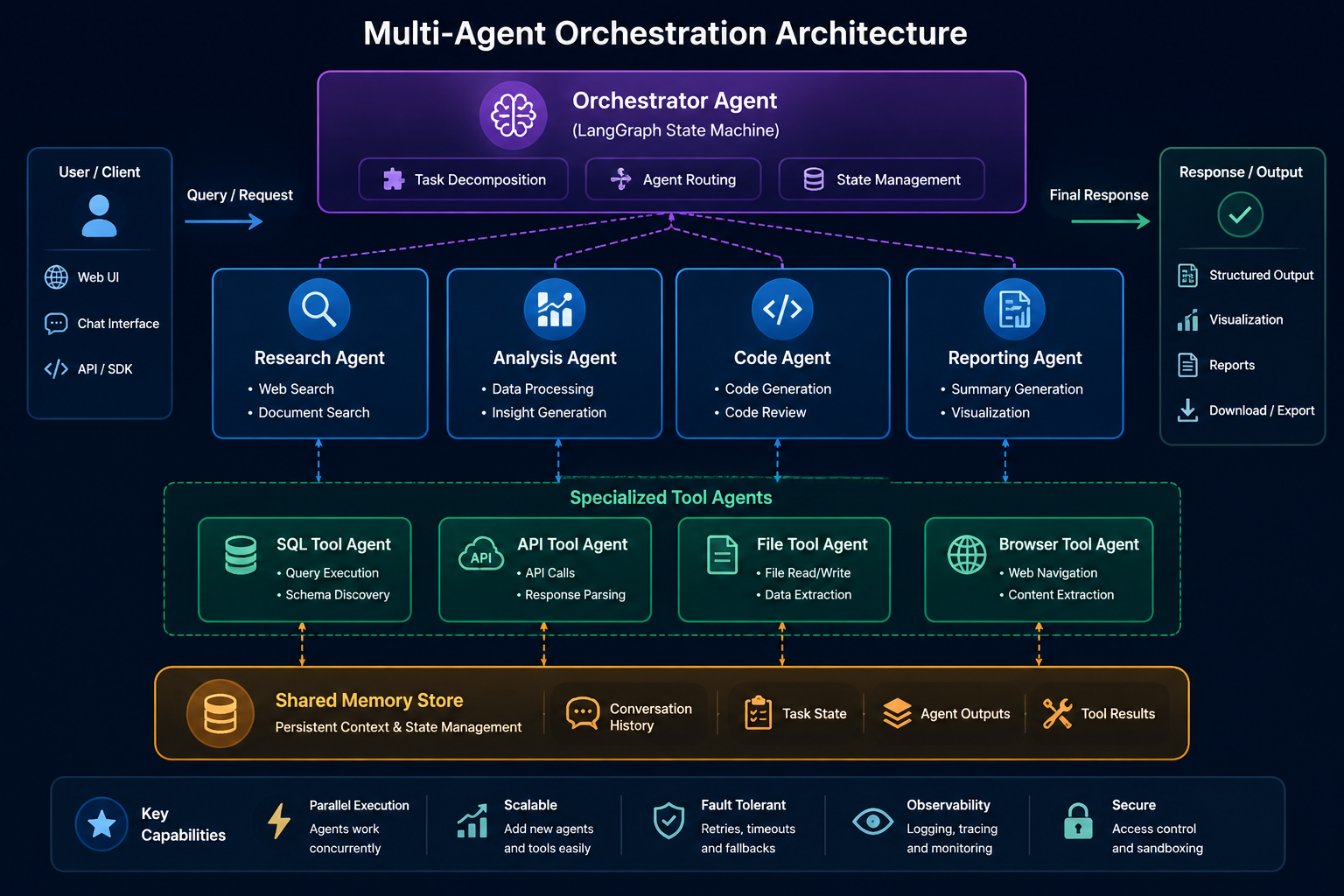
Core Vocabulary
🤖 Agent
An autonomous AI entity with a role, goal, backstory, and tools. Executes tasks independently.
📋 Task
A discrete unit of work assigned to an agent, with a description and expected output.
👥 Crew
The orchestrator that groups agents and tasks, managing execution flow and shared memory.
🔧 Tool
A capability given to an agent — web search, code execution, file I/O, API calls.
🧠 Memory
Short-term, long-term, entity, and shared memory layers that persist context across tasks.
⚙️ Process
Execution strategy — Sequential (ordered) or Hierarchical (manager-delegated).
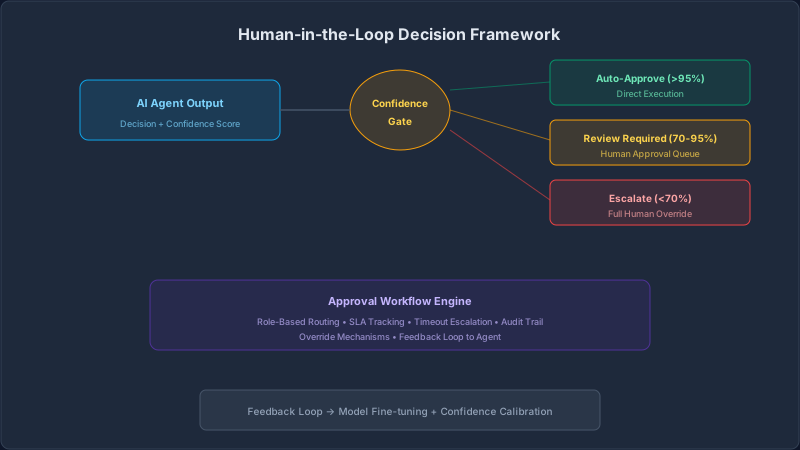
Architecture Overview
1. Defining Agents
Every agent needs four things: role, goal, backstory, and tools. The backstory is not cosmetic — it shapes how the LLM reasons and responds.
from crewai import Agent
from crewai_tools import SerperDevTool, ScrapeWebsiteTool

search_tool = SerperDevTool()
scrape_tool = ScrapeWebsiteTool()

# Agent 1 — Researcher
researcher = Agent(
    role="Senior Research Analyst",
    goal="Find comprehensive, accurate data on the given topic",
    backstory=(
        "You are an experienced research analyst with 15 years of expertise "
        "in technology market research. You are thorough, cite sources, "
        "and never fabricate data."
    ),
    tools=[search_tool, scrape_tool],
    memory=True,
    verbose=True,
    max_iter=5
)

# Agent 2 — Analyst
analyst = Agent(
    role="Data Analyst",
    goal="Analyze research findings and extract actionable insights",
    backstory=(
        "You are a quantitative analyst specializing in synthesizing complex "
        "data into clear patterns, trends, and business recommendations."
    ),
    tools=[],
    memory=True,
    verbose=True
)

# Agent 3 — Writer
writer = Agent(
    role="Technical Writer",
    goal="Produce clear, structured reports from analytical findings",
    backstory=(
        "You are a senior technical writer who transforms complex analysis "
        "into executive-ready documents with clarity and precision."
    ),
    tools=[],
    verbose=True
)
2. Defining Tasks
Tasks are the atomic unit of work. The context parameter creates a dependency chain — the analyst task receives the researcher's output automatically.
from crewai import Task

research_task = Task(
    description=(
        "Research the current state of {topic}. "
        "Cover: market size, key players, adoption trends, and challenges. "
        "Cite all sources."
    ),
    expected_output=(
        "A structured research report with data points, sources, "
        "key findings, and a summary section."
    ),
    agent=researcher
)

analysis_task = Task(
    description=(
        "Analyze the research findings. Identify patterns, compare competitors, "
        "and project future trends for the next 12 months."
    ),
    expected_output=(
        "An analytical summary with key insights, competitive comparison, "
        "and 3 strategic recommendations."
    ),
    agent=analyst,
    context=[research_task]   # ← receives researcher output
)

writing_task = Task(
    description=(
        "Write an executive report based on the research and analysis. "
        "Use clear headings, bullet points, and an executive summary."
    ),
    expected_output=(
        "A polished 800-word executive report in Markdown format, "
        "ready for C-suite presentation."
    ),
    agent=writer,
    context=[research_task, analysis_task]   # ← receives both outputs
)
3. Assembling the Crew
from crewai import Crew, Process

crew = Crew(
    agents=[researcher, analyst, writer],
    tasks=[research_task, analysis_task, writing_task],
    process=Process.sequential,   # ordered execution
    memory=True,
    verbose=True,
    max_rpm=10   # rate limit for LLM calls
)

result = crew.kickoff(inputs={"topic": "Enterprise RAG adoption 2026"})
print(result.raw)
4. Process Types
Sequential Process
Tasks execute in strict order. Each agent receives the output of the previous task as context.
Researcher → Analyst → Writer
    ↓            ↓         ↓
 Output 1 → Output 2 → Final
Best for: Linear workflows — research, analysis, reporting pipelines.
Hierarchical Process
A manager agent dynamically delegates tasks to sub-agents based on the goal.
      Manager Agent
     /      |       \
Researcher Analyst Writer
Best for: Complex, adaptive workflows where task order is not predetermined.
# Hierarchical process with a manager LLM
from langchain_openai import ChatOpenAI

crew = Crew(
    agents=[researcher, analyst, writer],
    tasks=[research_task, analysis_task, writing_task],
    process=Process.hierarchical,
    manager_llm=ChatOpenAI(model="gpt-4o", temperature=0.2),
    memory=True,
    verbose=True
)
5. Memory Architecture
| Memory Type | Scope | Purpose | |-------------|-------|---------| | Short-term | Current task | Conversation context, recent tool outputs | | Long-term | Across executions | Persistent knowledge, past results | | Entity | Named entities | Tracks people, companies, concepts | | Shared | All agents | Common knowledge pool for the crew |
from crewai.memory import LongTermMemory, ShortTermMemory, EntityMemory
from crewai.memory.storage.rag_storage import RAGStorage

crew = Crew(
    agents=[researcher, analyst, writer],
    tasks=[research_task, analysis_task, writing_task],
    memory=True,
    long_term_memory=LongTermMemory(
        storage=RAGStorage(
            embedder_config={
                "provider": "openai",
                "config": {"model": "text-embedding-3-small"}
            }
        )
    ),
    short_term_memory=ShortTermMemory(),
    entity_memory=EntityMemory(),
    verbose=True
)
6. Custom Tools
Tools extend what agents can do. Any Python function decorated with @tool becomes an agent capability.
from crewai.tools import tool
import requests

@tool("Company Financial Data")
def get_financials(company: str) -> str:
    """Fetch latest financial metrics for a given company ticker or name."""
    response = requests.get(
        f"https://api.financials.example.com/v1/company/{company}"
    )
    data = response.json()
    return (
        f"Revenue: {data['revenue']}, "
        f"Growth: {data['growth_yoy']}%, "
        f"Market Cap: {data['market_cap']}"
    )

@tool("Internal Knowledge Base")
def search_kb(query: str) -> str:
    """Search the enterprise knowledge base for internal documents."""
    # Connect to your vector store
    results = vector_store.similarity_search(query, k=3)
    return "\n\n".join([doc.page_content for doc in results])

# Assign to agent
researcher = Agent(
    role="Senior Research Analyst",
    goal="Find comprehensive data using internal and external sources",
    backstory="Expert analyst with access to financial and internal data.",
    tools=[search_tool, get_financials, search_kb],
    memory=True
)
7. Enterprise Workflow Example
Use Case: Automated competitive intelligence report generation for a product team.
from crewai import Agent, Task, Crew, Process
from crewai_tools import SerperDevTool

# --- Agents ---
market_researcher = Agent(
    role="Market Intelligence Specialist",
    goal="Gather competitive data on target companies",
    backstory="Expert in competitive analysis with deep knowledge of SaaS markets.",
    tools=[SerperDevTool()],
    memory=True
)

strategy_analyst = Agent(
    role="Strategy Analyst",
    goal="Identify strategic gaps and opportunities from competitive data",
    backstory="Senior strategist who translates market data into actionable plans.",
    memory=True
)

report_writer = Agent(
    role="Executive Report Writer",
    goal="Produce board-ready competitive intelligence reports",
    backstory="Specialist in executive communication and structured reporting.",
)

# --- Tasks ---
gather_task = Task(
    description=(
        "Research {competitor} across: product features, pricing, "
        "recent announcements, customer reviews, and hiring trends."
    ),
    expected_output="Structured competitive profile with data and sources.",
    agent=market_researcher
)

analyze_task = Task(
    description=(
        "Analyze the competitive profile. Identify our strengths vs {competitor}, "
        "gaps to address, and 3 strategic opportunities."
    ),
    expected_output="Strategic analysis with SWOT and opportunity matrix.",
    agent=strategy_analyst,
    context=[gather_task]
)

report_task = Task(
    description=(
        "Write a 1-page executive brief on {competitor}. "
        "Include: overview, threat level, key differentiators, recommended actions."
    ),
    expected_output="Executive brief in clean Markdown, ready for board presentation.",
    agent=report_writer,
    context=[gather_task, analyze_task]
)

# --- Crew ---
intel_crew = Crew(
    agents=[market_researcher, strategy_analyst, report_writer],
    tasks=[gather_task, analyze_task, report_task],
    process=Process.sequential,
    memory=True,
    verbose=True
)

result = intel_crew.kickoff(inputs={"competitor": "Salesforce Einstein AI"})
print(result.raw)
8. Callbacks & Observability
from crewai.callbacks import TaskCallback

def on_task_complete(task_output):
    print(f"✅ Task completed: {task_output.description[:60]}...")
    print(f"   Agent: {task_output.agent}")
    print(f"   Tokens used: {task_output.token_usage}")
    # Send to your monitoring system
    metrics.record(task_output)

def on_task_error(error):
    print(f"❌ Task failed: {error}")
    alerts.send(f"CrewAI task failure: {error}")

crew = Crew(
    agents=[researcher, analyst, writer],
    tasks=[research_task, analysis_task, writing_task],
    task_callback=on_task_complete,
    step_callback=lambda step: print(f"  → {step.action}: {step.result[:80]}"),
    verbose=True
)
9. Async & Parallel Execution
import asyncio
from crewai import Crew, Process

async def run_parallel_crews():
    """Run multiple crews concurrently for different topics."""

    topics = [
        "Enterprise AI adoption 2026",
        "Vector database market landscape",
        "LLM cost optimization strategies"
    ]

    async def run_crew(topic: str):
        crew = Crew(
            agents=[researcher, analyst, writer],
            tasks=[research_task, analysis_task, writing_task],
            process=Process.sequential,
            memory=False   # disable for parallel runs
        )
        return await crew.kickoff_async(inputs={"topic": topic})

    results = await asyncio.gather(*[run_crew(t) for t in topics])

    for topic, result in zip(topics, results):
        print(f"\n{'='*60}")
        print(f"Topic: {topic}")
        print(result.raw[:300])

asyncio.run(run_parallel_crews())
10. Production Deployment
Production Checklist
| Concern | Solution |
|---------|----------|
| Rate limiting | Set max_rpm on Crew, use exponential backoff |
| Cost control | Set max_iter per agent, use cheaper models for sub-tasks |
| Observability | Use step_callback + task_callback to log to Datadog/CloudWatch |
| Reliability | Wrap crew.kickoff() in try/except with retry logic |
| Security | Never pass raw user input — sanitize before kickoff(inputs={}) |
| Scalability | Use async execution + queue system (SQS, Redis) for high volume |
import time
from tenacity import retry, stop_after_attempt, wait_exponential

@retry(
    stop=stop_after_attempt(3),
    wait=wait_exponential(multiplier=1, min=4, max=30)
)
def run_crew_with_retry(inputs: dict) -> str:
    try:
        result = crew.kickoff(inputs=inputs)
        return result.raw
    except Exception as e:
        print(f"Crew execution failed: {e}")
        raise

# Usage
output = run_crew_with_retry({"topic": "Enterprise AI 2026"})
When to Use CrewAI
✅ Use CrewAI When
- Task naturally decomposes into specialist roles
- Multiple perspectives improve output quality
- Workflow has clear sequential or hierarchical stages
- You need role-based reasoning and accountability
- Long-running research or content pipelines
❌ Avoid CrewAI When
- Simple single-step LLM calls suffice
- Ultra-low latency is required (< 500ms)
- Task does not benefit from specialization
- Cost per execution must be minimal
- Real-time streaming responses are needed
Key Takeaways
- Role clarity drives quality — well-defined agent roles with specific backstories produce significantly better outputs than generic agents
- Task context chains are powerful — passing outputs between tasks via
context=[]eliminates redundant LLM calls - Memory is optional but valuable — enable it for workflows that benefit from accumulated knowledge across runs
- Hierarchical process for complex workflows — when task order is dynamic, let a manager agent decide delegation
- Instrument everything in production — use callbacks to track token usage, latency, and failures from day one